TLDR
- SM-DP+ stands for Subscription Manager Data Preparation Plus.
- It prepares and securely delivers consumer eSIM profiles.
- A QR code can contain its address and a matching activation code.
- Internet access is normally needed for the download.
- Users should enter only details supplied by a trusted provider.
The system combines preparation and delivery
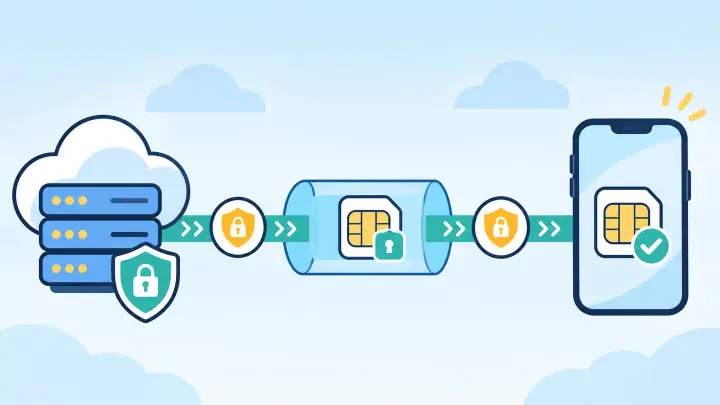
An eSIM profile contains protected carrier credentials and network settings. Those items cannot be emailed as an ordinary attachment. The SM-DP+ securely prepares the profile for the intended subscription and makes it available to the device.
The “plus” name belongs to the consumer remote-provisioning system used by phones, tablets, and similar products. Other connected-device systems can use different architecture.
Customers rarely visit an SM-DP+ server in a browser. The phone’s built-in eSIM software communicates with it during setup.
A profile download follows a controlled sequence
- The provider creates or assigns a subscription order.
- The SM-DP+ prepares the matching eSIM profile.
- The customer receives a QR code or manual details.
- The phone contacts the server through an internet connection.
- The phone and server check that the request is valid.
- The encrypted profile is installed in secure eSIM hardware.
- The new line can register on an allowed mobile network.
The exact messages are more complex, but this sequence explains why setup can fail before any cellular signal is available.
The address tells the phone which server to contact
Manual setup may ask for an SM-DP+ address and activation code. The address identifies the provider’s subscription-management server. The code points toward the assigned order or profile.
A QR code packages these details in a form the phone can read. Some providers add a confirmation code for another check. Copy spaces and punctuation exactly when entering values by hand.
The address is not an APN
An APN helps an already installed mobile line reach data service. An SM-DP+ address is used earlier to obtain the profile. Mixing the two fields will not work.
The design protects carrier credentials in transit
The device, secure eSIM element, and server authenticate the provisioning session. Encryption protects the profile while it moves. The profile is then stored in hardware designed to keep secret credentials isolated from ordinary apps.
An activation code may be single-use or bound to one order. This limits casual duplication. Deleting the profile does not automatically reset the code.
Do not publish QR codes, SM-DP+ details, or confirmation codes. Use only the information shown in the provider’s official app, account, or verified message.
Most errors come from details, connectivity, or code status
“Invalid code” can mean a typo, an expired order, or a profile already downloaded. “Unable to activate” may result from weak Wi-Fi, an unsupported phone, carrier lock, or a temporary server issue.
Confirm the device on uPhone’s compatibility checker. Try stable Wi-Fi and automatic date and time. Copy the address again rather than guessing at a character.
If the profile is already listed in mobile settings, do not scan the code again. Follow uPhone’s troubleshooting steps and contact the provider with the exact error.
Most travelers only need to scan and confirm
The provider handles profile preparation, and the phone handles secure communication. The traveler connects to Wi-Fi, opens the add-eSIM screen, scans the code, and confirms the new line.
uPhone’s installation guide covers that visible process. Afterward, label the line and follow the provider’s activation timing. Installing and activating are not always the same event.
When moving to a new phone, use an approved transfer or obtain a replacement profile through the transfer process. An SM-DP+ string should not be treated as a reusable backup.
SM-DP+ is the secure delivery point behind consumer eSIM setup
The server prepares the assigned carrier profile, verifies the request, and sends the protected package to the device’s eSIM hardware. Its address tells the phone where that process begins.
Users do not need to manage the server. They only need trusted activation details, an eligible phone, a reliable internet connection, and care not to expose the code.